Reviewing Blocked Drug and Supplier Updates (Review Overrides)
Review Overrides allows you to review blocked downloads and choose whether or not to apply the updates. Drug Updates and Supplier Price Updates are reviewed separately. A Drug Update Reports provides a list of all new and updated drugs.
Note: Review overrides should be checked on a daily basis.
The Drug Updates tab in Review Overrides provides a list of blocked updates for the following fields (as per the Save Flag in the Drug Folder):
- Generic Name
- Trade Name
- Strength
- Drug Form
- Manufacturer
- Drug Schedule
- Enterprise Flag
The Supplier Price Updates tab in Review Overrides provides a list of McKesson Supplier Price updates that have been blocked by either the Block $ Updates flag in the Drug folder or the Block PharmaClik Rx’s Supplier Price Updates flag in the Supplier folder.
To Review Blocked Drug and Supplier Updates:
- Press the More > Updates > Review Overrides. The Drug Updates tab appears. This lists ssuggested updates for drugs protected by the Block Updates flag. Use your mouse to rollover the fields below for more information.
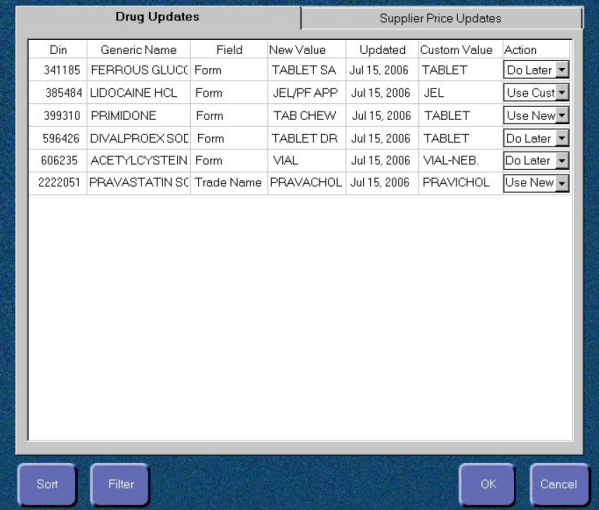
- For each row listed on the screen, select an option from the Action dropdown list. The possible options are:
- Use Custom: Select this to keep your customized setting for the drug.
- Use New: Select this to apply the updated information to the drug.
- Do Later: This is default setting; the item will remain in Review Overrides for you to review at another time.
- Once an action has been selected for each item, press the OK button to apply the settings. This applies all Use Custom and User New selections and removes them from Review Overrides; Do Later selections remain in Review Overrides.
- Select the Supplier Price Updates tab. Use your mouse to rollover the fields below for more information.
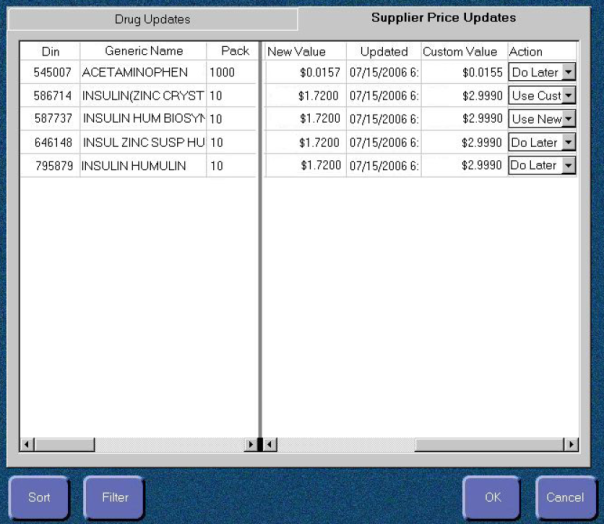
- For each row listed on the screen, select an option from the Action dropdown list. The possible options are:
- Use Custom: Select this to keep your customized setting for the drug.
- Use New: Select this to apply the updated information to the drug.
- Do Later: This is default setting; the item will remain in Review Overrides for you to review at another time.
- Once an action has been selected for each item, press the OK button to apply the settings. This applies all Use Custom and User New selections and removes them from Review Overrides; Do Later selections remain in Review Overrides.